These are blocks that will be saved when you save your base in game. Blocks you can craft or loot are shown, including the saveable block choices inside obtainable VariantHelpers. Search by block name or use the tags to narrow the list.
—saveable blocks
Block Browser
Find a saveable block
JSON generatedLoading…
Tags
—matching blocks
Use “Copy internal name” when you need the exact game identifier.
Loading saveable blocks…
Could not load the current block list.Check the local enriched saveableBlocks download.
No matching blocksTry a different search or remove a tag.
Page 1
Player Documentation
🏗️ Base Copy System – Player Guide
Save a copy of your base from inside your land claim and spawn it again later inside your land claim.
⚠️ Before You Start!
Always copy bases built on flat ground. Uneven ground may cause broken spawns.
You can now save underground bases.
Admins cannot fix broken spawns — it is your responsibility to save correctly.
You cannot copy bases that span multiple land claims. Saving is per-claim only.
After spawning your base, immediately place a land claim.
✅ What You Can Do
Save a base layout from inside your own land claim.
Spawn a previously saved base inside your own land claim.
Keep up to 6 saved bases at a time.
List and delete your saved bases whenever you want.
📌 Requirements
You must be standing inside your OWN land claim.
You can only save/spawn bases from land claims you personally own.
Your saved base must fit inside your current land claim size.
In-game
💾 Commands
1
Save your base
/savebase <name>
Example: /savebase mybase1
One word only — no spaces.
Letters, numbers, underscore and hyphen only.
2
Spawn your saved base
/spawnbase <name>
Example: /spawnbase mybase1
If no name is given, your last saved/used base is spawned.
3
List your saved bases
/listbases
Shows all saved bases.
Shows which one is default.
Shows your cooldown status.
4
Delete a saved base
/delbase <name>
Example: /delbase mybase1
If no name is given, your default base is deleted.
Base Clearing/clearclaim
Clear all blocks within your land claim area.
⏱️ Cooldown Rules
You can spawn a base once every 20 minutes.
🧭 Spawn Options
You can select normal spawning or keystone height to spawn higher or lower depending on the ground. You can also choose the direction the base faces.
Update 25/04/26
Important Expectations
🧱 What Gets Saved
This system saves structure blocks and some deco.
❌ Not included
Storage — chests, safes, loot containers.
Workstations — forge, workbench, mixers, etc.
Electrical systems — generators, batteries, wiring, lights and switches.
Traps and turrets.
Farming blocks and crops.
Most functional blocks and special devices.
How to tell in game
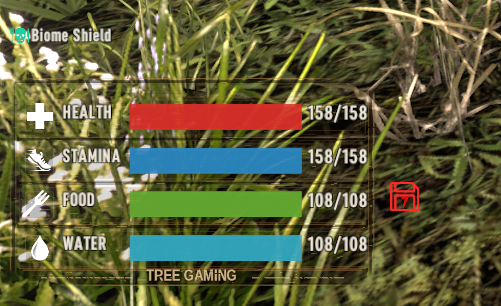
Blocks that will be saved show a red save floppy disk icon next to the water, food, stamina and health bars.
✔️ What this means
Your base shape returns, but you must place stations, storage, traps, power and farming again.
⚠️ Safety Tips
Do not use /spawnbase while the server is lagging or restarting.
Clear and level the area before spawning your base.
Use /listbases if you forget a base name.
After spawning, immediately place a land claim.
Video
Player Base Spawning Update
🚫 Abuse Policy
Any attempt to exploit this system will result in a ban.
Spawning unnecessary bases or abusing the system will permanently remove your access.